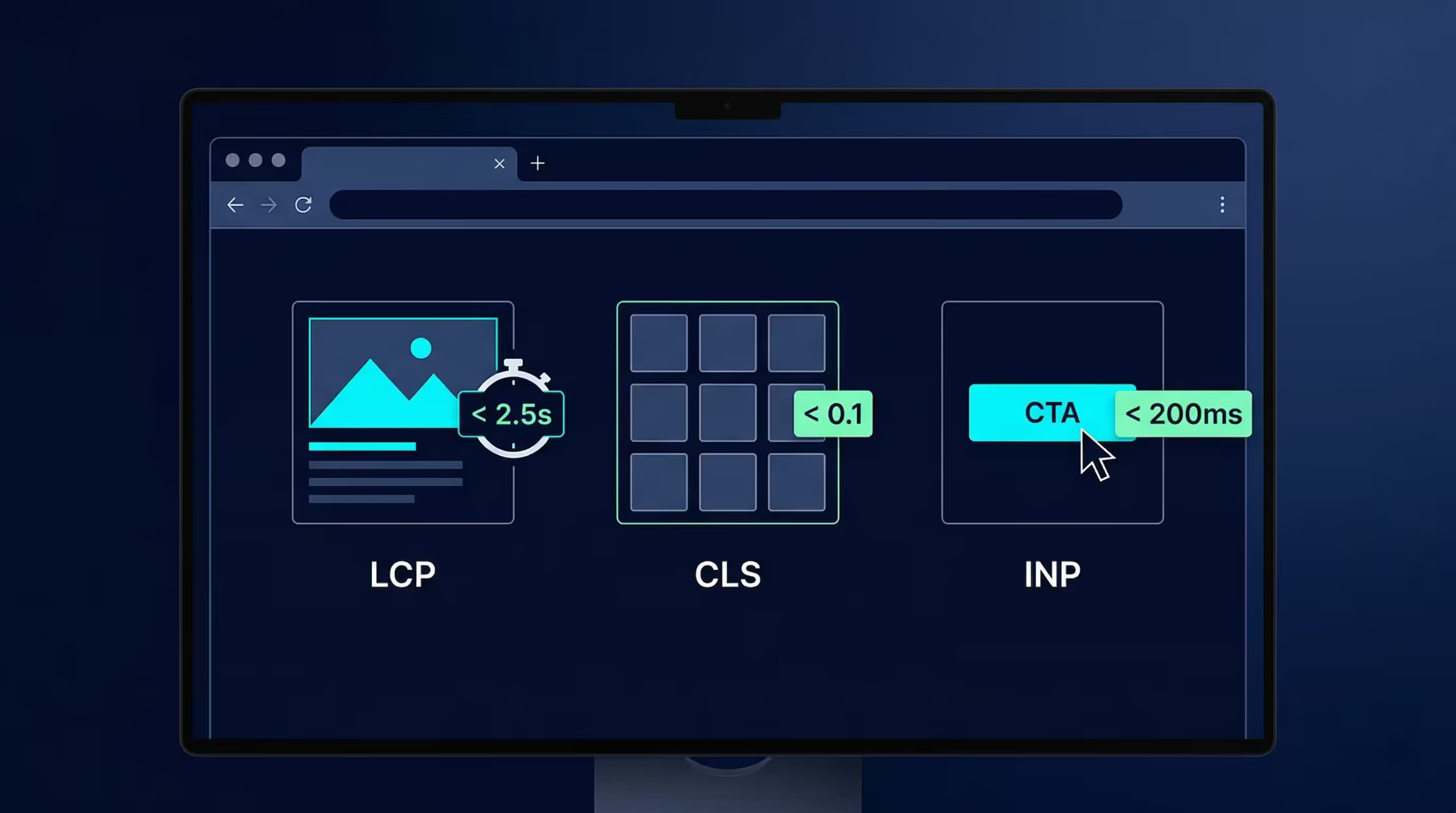
Your website looks great, your content is solid, but your Google rankings are stagnant. The problem might not be what you can see on the screen. It might be three invisible scores that Google watches closely every time someone visits your site. My team and I have spent years architecting enterprise WordPress platforms, and we constantly see businesses losing revenue simply because they ignore Google’s official user experience report card.
These metrics dictate whether Google views your website as a frustrating maze or a seamless journey. If you already know your site is struggling and need an immediate, surgical fix, you can go straight to our Core Web Vitals Optimization Services to get it resolved. Otherwise, this guide will explain exactly what these technical terms mean for your bottom line without touching a single line of code.
What Are Core Web Vitals? (And Why Should You Care?)
Core Web Vitals are three specific performance metrics Google uses to measure real-world user experience, focusing entirely on loading speed, visual stability, and interactivity. Google officially integrated these metrics into their Page Experience ranking signal, meaning your technical performance directly influences your organic search visibility.
This is not just a developer problem. It is a fundamental business challenge that directly impacts SEO rankings, bounce rates, and revenue. Think of Core Web Vitals like Google secretly riding shotgun with every visitor to your site. Google is constantly rating how fast the page loaded, how stable the layout remained, and how quickly the interface responded to their clicks.
Here is a truth most agencies will not tell you: Lighthouse scores are vanity metrics that lie to you. Passing a simulated lab test on your local machine means absolutely nothing if your real-world Chrome User Experience Report (CrUX) field data is failing. Field data represents actual human beings interacting with your website on cellular connections and older devices. Field data is the only thing Google uses for ranking, and field data is the only thing that pays the bills.
Google data confirms that as page load time goes from one second to three seconds, the probability of a user bouncing increases by 32 percent. Every millisecond of delay throttles your conversion rate. When you architect a website strictly for visual appeal without considering how the browser renders that code, you actively build roadblocks for your customers.
The Three Core Web Vitals Decoded
There are three main metrics you need to understand. Each one measures a distinctly different part of how your website feels to a visitor from the moment they click your link to the moment they complete a transaction.
LCP (Largest Contentful Paint) : How Fast Does Your Page Actually Feel?
Largest Contentful Paint measures exactly how long it takes for the single largest visual element on your screen to fully render and become visible to the user. It directly answers the primary question of every visitor landing on your site: “How fast does this page feel to load?”
Imagine walking into a high-end restaurant. LCP is the exact moment the waiter places the menu on your table. If you are left standing at the host stand for five minutes just waiting for that menu, you are already frustrated. You are likely reconsidering your choice to stay. The same logic applies to your website. If your massive hero image or main promotional headline takes four seconds to appear, the user assumes your site is broken.
Here is how Google officially grades your LCP performance based on real user data:
From a business perspective, a slow LCP means visitors leave before they even see your offer. Every additional second of loading delay causes an exponential increase in your bounce rate. My team frequently audits enterprise sites where the marketing department uploaded massive, uncompressed background images. Combine that with render-blocking JavaScript in the website header and a slow server response time (TTFB), and you have a recipe for lost revenue.
CLS (Cumulative Layout Shift) : Does Your Page Jump Around?
Cumulative Layout Shift calculates the total amount of unexpected movement your page content makes while the browser continues loading assets in the background. It answers the question of visual stability: “Is this layout locked in place, or does it shift violently as images and ads finish downloading?”
Picture this scenario. You are holding your phone, about to tap the checkout button to finalize a purchase. A split second before your finger hits the screen, a promotional banner loads at the top of the page. The entire layout gets pushed down, and you accidentally tap a completely different link that takes you away from the cart. That is Cumulative Layout Shift. It is the exact moment a customer abandons their purchase in pure frustration.
Google grades visual stability with these thresholds:
This is where the translation between UI design and technical engineering becomes critical. In Figma, a designer might use “Hug” or “Fill” to make a container dynamically wrap its text. However, if your frontend developer does not translate that logic into strict flex-grow properties or assign explicit width and height attributes in your HTML, the browser has no idea how much space to reserve. The browser renders the text first, then downloads the image later, shoving all your text out of the way. Unstable layouts lead to accidental clicks, high cart abandonment, and severe organic ranking penalties.
INP (Interaction to Next Paint) : Does Your Page Actually Respond?
Interaction to Next Paint is a metric that tracks how quickly your website visually updates after a user clicks a button, taps a link, or types on their keyboard. It measures responsiveness. When someone interacts with your site, INP calculates exactly how many milliseconds pass before the interface actually gives visual feedback.
Google officially replaced the outdated First Input Delay (FID) metric with INP in March 2024. This change happened because INP is a much stricter, more realistic measurement. It evaluates every single interaction throughout the user’s entire visit, not just their first click. You can read more about this metric evolution on the official web.dev INP documentation.
Google scores your page responsiveness as follows:
To understand the mechanics of this bottleneck, look at the architectural breakdown below:
INP Performance: Visual Feedback
Browser Main Thread Execution
User clicks “Add to Cart”. The browser’s main thread is clear. The CSS :active state triggers instantly. The UI immediately reflects the interaction while the backend processes the API request in the background.
User clicks “Add to Cart”. A bloated JavaScript bundle or excessive DOM elements from a page builder is currently hogging the main thread. The button freezes. The user assumes the site broke and taps it three more times, compounding the delay.
Poor INP is a silent killer for B2B portals and WooCommerce stores. It is usually caused by massive DOM sizes generated by drag-and-drop page builders, or by heavy third-party tracking scripts that monopolize the browser’s main thread. If your checkout flow feels sluggish on a mobile device, your INP is failing, and your revenue is leaking.
How Core Web Vitals Directly Impact Your SEO Rankings
Core Web Vitals act as a tiebreaker in Google search rankings. If you and your competitor publish equally valuable content, Google will push the faster, more stable, and more responsive website to the top of the search engine results page (SERP). Google confirmed this mechanic when they rolled out the Page Experience update, effectively turning technical performance into an unavoidable SEO ranking factor.
However, a massive misconception plagues the SEO and developer communities regarding how Google measures this. There are two entirely different sets of data: Lab data and Field data.
Lab data is what you see when you run a Lighthouse audit or a standard GTmetrix test. It is a simulation. It assumes a specific device, a specific network speed, and a clean browser. Field data is collected by the Chrome User Experience Report (CrUX). This is the aggregated, real-world data from actual humans using Chrome browsers to navigate your site under real conditions.
Google’s ranking algorithm strictly relies on CrUX field data. You cannot trick the algorithm by optimizing purely for a Lighthouse score. This is why professional WordPress Core Web Vitals Optimization goes far beyond installing a generic cache plugin. It requires monitoring real CrUX field data over a 28-day rolling window to guarantee the changes actually improve the human experience.
The Hidden Revenue Cost of Failing Core Web Vitals
Failing Core Web Vitals creates a cascading failure across your entire digital marketing funnel. It does not just suppress your organic visibility. It actively burns your paid advertising budget. Google Ads uses landing page experience to calculate your Quality Score. If your page is sluggish and shifts around, your Quality Score drops, forcing you to pay a higher Cost Per Click (CPC) than your competitors for the exact same keyword.
Beyond advertising costs, performance dictates conversion. A slow, unstable site screams “unprofessional” to a first-time visitor. We track this correlation daily in enterprise B2B environments. When a procurement manager tries to navigate your product portal and the buttons freeze due to poor INP, they simply close the tab and move to a competitor.
Here is exactly how each failing metric bleeds revenue from your business:
How to Check Your Core Web Vitals Score Right Now
You do not need to be a developer to check the health of your website. Google provides three free tools to diagnose your performance, and I highly recommend checking them in this exact order.
First, open Google Search Console and navigate to the Experience tab, then click Core Web Vitals. This is your most reliable source of truth. It shows exactly how Google views your entire domain based on 28 days of real CrUX field data.
Second, use PageSpeed Insights (pagespeed.web.dev). Paste your specific URL here. This tool is incredibly useful because it displays both real-world field data at the top and simulated lab data at the bottom, flagging the specific assets causing bottlenecks.
Finally, for those slightly more comfortable with technical interfaces, you can use Chrome DevTools. Open Chrome, hit F12, navigate to the Lighthouse tab, and run a localized audit.
These tools will tell you what is broken. But diagnosing WHY it is broken and executing a fix without destroying your site layout is a completely different challenge. If your scores come back in the red and you are not sure where to start, my WordPress performance optimization service begins with a forensic audit that maps every bottleneck down to the exact script or DOM element causing the failure.
Common Reasons WordPress Sites Fail Core Web Vitals
WordPress powers a massive portion of the web, but its architecture is inherently prone to performance degradation if not managed by an expert. My team consistently sees the same patterns causing enterprise and B2B sites to fail.
Bloated page builders are the primary offenders. Drag-and-drop tools like Elementor or Divi generate thousands of unnecessary HTML <div> containers just to display a simple text block. This massive Document Object Model (DOM) size completely chokes the browser’s main thread, resulting in catastrophic INP and LCP failures.
Plugin overload compounds the issue. Every time you install a new plugin, it often injects its own JavaScript and CSS files globally across every single page, regardless of whether that page actually uses the plugin features.
Generic caching plugins are also a trap. Site owners install tools like WP Rocket expecting a miracle cure. While these tools are great for basic caching, they only apply surface-level fixes. They cannot flatten a bloated DOM hierarchy or surgically restructure how your server delivers critical CSS.
LCP vs CLS vs INP Quick Reference Summary
For a rapid overview of what these metrics entail, reference the technical mapping below.
What Does It Take to Actually Fix Core Web Vitals?
True, lasting improvement requires architectural-level changes. Blindly turning on settings like “Defer all JavaScript” in a caching plugin is the fastest way to break your website’s functionality entirely.
Fixing these metrics requires dequeuing unused scripts on a per-page basis. It requires extracting critical CSS and inline-loading it so the browser does not have to wait for external files. It requires flattening DOM structures natively instead of relying heavily on drag-and-drop builder bloat. Most importantly, it requires validating every single technical adjustment against real CrUX field data over a 28-day window to ensure the fix is permanent.
This exact gap is what my team resolves. Our Core Web Vitals Optimization Services are built specifically to execute surgical, hardcoded infrastructure changes validated by real field data, ensuring your WordPress site scales, ranks, and converts without compromise.
Frequently Asked Questions
Q1: Do Core Web Vitals directly affect my Google rankings? Yes. Google confirmed Core Web Vitals as an official Page Experience ranking signal since May 2021. While strong content and backlinks still matter most, CWV acts as a tiebreaker in competitive SERPs. Failing all three metrics can actively suppress your organic visibility.
Q2: What is the difference between LCP, CLS, and INP? Each metric measures a distinctly different dimension of user experience. LCP measures loading speed by tracking how fast your main content appears. CLS measures visual stability by tracking if the layout shifts unexpectedly. INP measures interactivity by calculating how quickly your page responds to clicks and taps. All three must pass for Google to consider your page a high-quality experience.
Q3: My Lighthouse score is 90+, but Google Search Console still shows failing CWV. Why? Lighthouse produces lab data through a simulated test in a highly controlled environment. Google Search Console relies on field data, which consists of real measurements from actual Chrome users navigating your site on various devices and network speeds. Google strictly uses field data for ranking, meaning a good Lighthouse score does not automatically guarantee passing CWV in Search Console.
Q4: INP replaced FID. What changed, and does it matter? First Input Delay (FID) only measured the delay before the browser started responding to the very first interaction of a session. Interaction to Next Paint (INP) officially replaced FID in March 2024 because it is much more comprehensive. INP measures the full response time of all interactions throughout the entire page session, making it a much stricter and more realistic measure of how responsive your site actually feels.
Q5: How long does it take for Google to recognize Core Web Vitals improvements? Google utilizes a rolling 28-day window of real user data. Even if you deploy the perfect technical fix today, your URLs will not transition from Poor to Good in Google Search Console until enough real users have experienced the optimized version. This typically takes three to four weeks after deployment.
Q6: Can a WordPress site pass Core Web Vitals with standard caching plugins? It entirely depends on the complexity of the site. Simple blogs using extremely lightweight themes can sometimes pass using plugins like WP Rocket or LiteSpeed Cache. However, complex business sites built with Elementor, running WooCommerce, or loaded with third-party tracking scripts typically require deep architectural changes that generic plugins cannot execute.
Q7: What is the fastest way to fix failing Core Web Vitals on WordPress? The fastest and safest path to a permanent fix is a professional technical audit that identifies the exact bottlenecks in your rendering path rather than relying on a generic plugin setup. If you want to stop guessing and get your scores validated against real CrUX data, explore our WordPress Core Web Vitals Optimization Services to permanently resolve the issue.

Initiate Secure Comms
Join elite B2B founders receiving my private WordPress architecture blueprints directly to their inbox. No spam, pure engineering.